Create one clear plan for the band
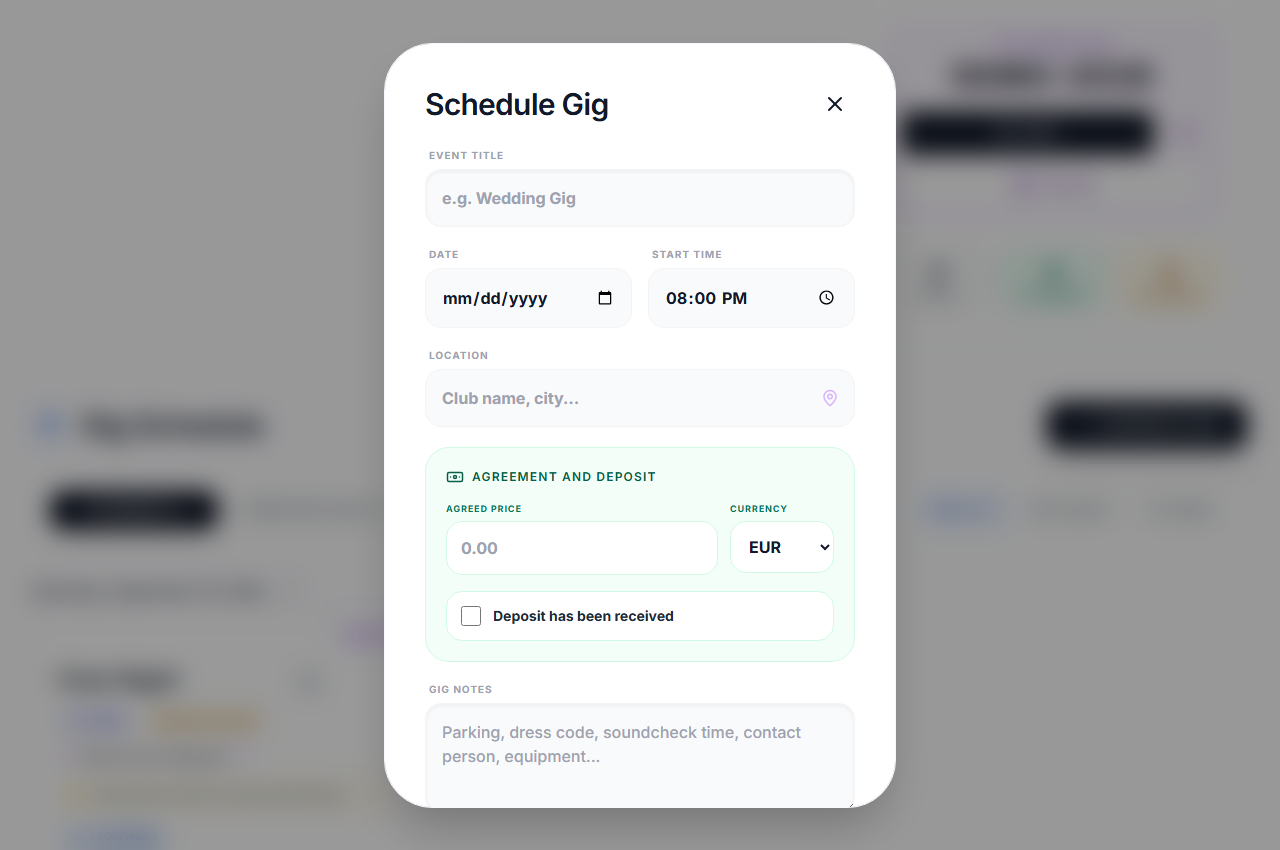
Open scheduling from the dashboard with an account that has calendar access and the required permissions. Give the event a recognizable name, especially when several bookings are at the same venue.
- Enter the date, start time and location of the performance.
- Add notes for arrival, soundcheck, parking, equipment or the contact person.
- Choose the participating members and save the gig, then open its details to check the information.
Check member responses, not just message delivery
A sent notification is not the same as a confirmed musician. Review the event responses to see who has confirmed, declined or not yet answered. Use band chat to resolve a clash. Push delivery requires a supported device, permission and a working connection, so check responses directly for important bookings.
Record the agreed price and deposit
Enter the agreed amount and currency, and mark whether a deposit has been received. These fields keep the agreement alongside the event notes. They are records entered by the band, not a payment processor, an invoice or automatic proof that a client has paid.
Use your calendar and keep past gigs
Open the gig details to review or, with permission, edit the booking. Use the Google Calendar link or the calendar file for Apple Calendar and Outlook. An exported event is a copy, not a two-way calendar subscription: if a time changes, check the copy too. Past gigs can be reviewed in the completed area instead of crowding the upcoming schedule.
At the gig
A wedding booking includes a deposit, an early soundcheck and a separate stage entrance. Record those details when scheduling the gig, check the participating musicians and their responses, and export the date to your personal calendar. When the venue changes the arrival time, update the booking and tell the band in chat to review it.
Practical questions
Is the gig calendar included in Free?
No. Free lets you try a limited repertoire and band communication. Scheduling requires the appropriate plan or granted access. Current plans and availability are listed on the home page.
Can I enter a location without a maps service?
Yes. You can type a venue or address as text. Add useful directions in the gig notes; do not rely on an ambiguous venue name alone.
Can the plan be changed after it is saved?
Authorized leaders can reopen the booking and update its details. Review member responses and any exported calendar copies after a significant change.
Plans and availability
Start with Free: up to 25 band songs, 2 setlists, band chat and 5 song requests per rolling 24 hours. Calendar and other premium features require the appropriate access. Check current plans and availability before signing up.